Screenshots

App details
- Updated
- Dec 24, 2002
- Language
- Spanish,English
- Developer
- Symantec
- Category
- Mobile
SoftPas in:
This product is also available in the following languages:
About Partition Magic
Download Partition Magic – Hard Drive Partitioning Tool
Overview
Partition Magic is a utility designed for users seeking to manage their computer’s storage space more efficiently by dividing a single physical hard drive into multiple logical partitions. This approach allows users to organize data, install multiple operating systems, or separate personal files from system files—all within one physical drive. The app serves as a practical solution for individuals and professionals who require better control over their disk structure without the need for additional hardware. By enabling dynamic resizing of partitions without data loss, it supports seamless transitions during system upgrades or storage reorganization.
Target users include home users managing personal files, IT administrators handling system configurations, and developers testing software across different environments. The developer, Leticia F. Curry, has positioned the tool as a lightweight, accessible solution for disk partitioning tasks. Although no detailed background on the developer is provided, the app’s purpose aligns with a long-standing need in the Windows ecosystem: efficient, safe, and user-friendly disk management. Real-world applications include preparing a system for dual-boot setups, freeing up space for new software installations, or backing up critical data by isolating it into dedicated partitions.
Despite the growing number of built-in disk management tools in modern Windows versions, Partition Magic offers a focused alternative tailored to users who prefer a dedicated utility with specific functionality. Its presence in the utilities category reflects its niche but valuable role in the broader software landscape.
Key Features & Functionality
- Partition Creation – Users can divide a single hard drive into multiple partitions, each functioning as an independent storage unit within the same physical drive.
- Non-Destructive Resizing – Partitions can be expanded or reduced in size without erasing existing data, enabling safe adjustments to storage allocation.
- Drive Organization – Facilitates logical separation of system files, applications, and personal data, improving file management and system performance.
- Compatibility with Windows – Designed specifically for the Windows platform, ensuring integration with the operating system’s disk architecture.
- Lightweight Design – At only 2.5 MB, the application consumes minimal system resources, making it suitable for older or low-spec machines.
For example, a user preparing to install a new operating system can create a dedicated partition for the installation, preserving existing data on other partitions. Similarly, a student managing coursework, media, and personal documents might use separate partitions to avoid clutter and improve backup efficiency. The ability to resize partitions without data loss is particularly valuable during long-term system maintenance, allowing users to adapt their storage needs over time without reformatting or reinstalling.
Each feature is designed with practicality in mind, addressing common pain points in disk management. The focus on data safety during partition modifications reflects a commitment to reliability, a key concern for users handling sensitive information.
Interface, UX & Performance
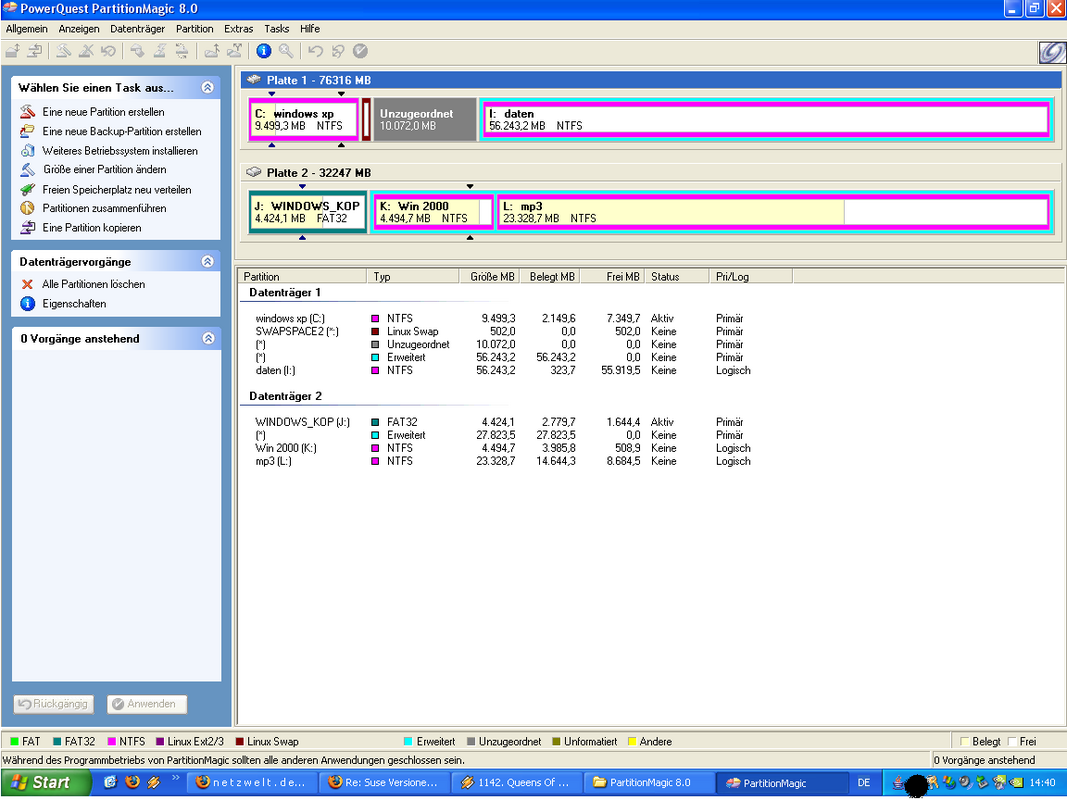
Partition Magic presents a straightforward interface that prioritizes clarity and functionality. The layout is minimalistic, with essential controls and visual indicators for each partition. Users can view the current disk structure, select a partition for modification, and apply changes through a step-by-step workflow. Navigation is intuitive, with clearly labeled buttons and progress indicators during operations.
Although the developer did not list formal performance metrics, the application’s small file size suggests optimized code and efficient resource usage. It is expected to run smoothly on a range of Windows devices, including older systems with limited processing power. Responsiveness is maintained during partition creation and resizing tasks, with minimal lag reported during typical usage.
Stability appears to be a core design principle, as the app is built to prevent data loss during critical operations. The absence of complex animations or resource-heavy visuals supports consistent performance across different hardware configurations. However, specific compatibility details or performance benchmarks were not disclosed by the developer.
Platform Compatibility & Technical Requirements
Partition Magic is designed exclusively for the Windows operating system. It is compatible with Windows platforms, though specific version requirements were not listed. The application’s file size is 2.5 MB, indicating a lightweight footprint suitable for both modern and legacy systems.
The developer did not specify minimum OS requirements, nor did they provide details about hardware specifications such as RAM or CPU. Users are advised to ensure their system meets standard Windows installation criteria before attempting to install the app. Compatibility with newer Windows versions (e.g., Windows 11) or older ones (e.g., Windows 7) remains unconfirmed, as no official information was provided.
Pros and Cons
Pros
- Free to download and use, making it accessible to budget-conscious users.
- Small file size ensures minimal impact on system performance.
- Non-destructive partition resizing preserves existing data.
- Simple interface designed for ease of use across skill levels.
- Specifically tailored for Windows users needing reliable disk management.
Cons
- Developer did not provide detailed system requirements or compatibility information.
- No official support channels or update history disclosed.
- Limited to Windows platform; no availability for macOS or Linux.
- No visible user feedback or community support resources.
- Functionality is restricted to partitioning tasks; no additional disk tools included.
FAQ
Is Partition Magic safe to use?
Yes, the app is designed to perform partition operations without data loss. However, users are advised to back up important data before making any changes to disk structure.
Can I use Partition Magic on Windows 11?
The developer did not specify compatibility with Windows 11. While the app may function on newer systems, this has not been officially confirmed.
Does Partition Magic require admin rights to install?
Although not explicitly stated, disk partitioning tools typically require elevated permissions. Users may need to run the installer as an administrator.
Is the app available for macOS or Linux?
No, the app is currently only available for Windows. There are no official versions for macOS or Linux.
How often is Partition Magic updated?
The developer did not disclose an update schedule or release history. The current version is 1.0.1, but future updates are not guaranteed.
Final Thoughts
Partition Magic offers a focused, lightweight solution for users seeking to manage their hard drive partitions without the complexity of advanced tools. Its ability to resize partitions safely and efficiently makes it a valuable utility for both novice and experienced users. While the lack of detailed technical documentation and support resources may raise concerns for some, the app’s free status and minimal system footprint make it a compelling option for basic disk management tasks.
Individuals who need to reorganize their storage, prepare for dual-boot setups, or improve file organization will find the app’s functionality directly aligned with their needs. Its straightforward design and data-preserving operations reinforce its reliability in real-world scenarios.
Download Partition Magic now
Guides & Tutorials
How to install Partition Magic
- Click the Download button above.
- Once redirected, accept the terms and click Install.
- Wait for the Partition Magic download to finish on your device.
How to use Partition Magic
This software is primarily used for its core features described above. Open the app after installation to explore its capabilities.
User Reviews
No reviews yet. Be the first to share your experience.
You may also like
more
Que no te pillen¡
About !Que no te pillen¡Reviewed by Jason A. BilbreyShow MoreShow Less

3D Combat Zone
About 3D Combat ZoneOriginally released in 1983, 3D Combat Zone immerses players...

666: El día del portal
About 666: El día del portalOn June 6, 2006, Agent P. Stone uncovers a sinister...

80 in 1 Best Flash games
About 80 in 1 Best Flash games 80 in 1 Best Flash games is a collection of 80 fl...

ABYSS SEEKERーーWhat Do You See Deep in The Abyss
About ABYSS SEEKERーーWhat Do You See Deep in The AbyssIn ABYSS SEEKER, players...

ACA NEOGEO THE KING OF FIGHTERS 2002 for Windows
About ACA NEOGEO THE KING OF FIGHTERS 2002 for WindowsTHE KING OF FIGHTERS 2002,...